Posts

Showing posts with the label GST

Chanakya ERP Update Release 1.1.1.9

Image
𝗡𝗼𝘄 𝗗𝗼𝘄𝗻𝗹𝗼𝗮𝗱 𝗮𝗻𝗱 𝗥𝗲𝗰𝗼𝗻𝗰𝗶𝗹𝗲 𝗚𝗦𝗧𝗥𝟮𝗕 𝗶𝗻 𝗮 𝗰𝗹𝗶𝗰𝗸 𝘄𝗶𝘁𝗵𝗶𝗻 𝘀𝗲𝗰𝗼𝗻𝗱𝘀  For More Query/Support, Feel free to Generate Ticket or Call us on +91 8447740155 Thank You !

Chanakya ERP Update Release 1.1.1.3

Image
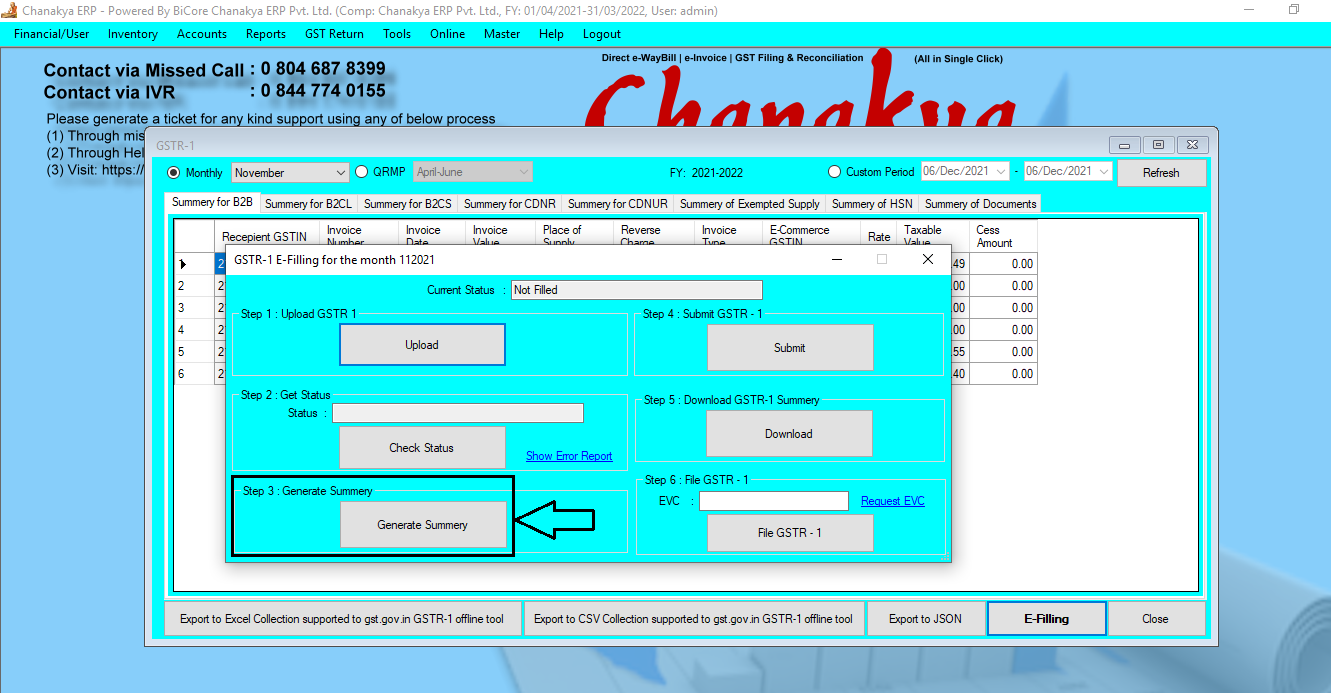
  GSTR1 Update According to GST Norms I n GSTR1 one Step has increased during filling i.e., "Generate Summary" which has been implemented in Chanakya ERP  After "Get Status", now Click on "Generate Summary" option to proceed further, as shown in below image For Filing step of GSTR1 you can visit to particular Blog "GSTR1 Filling Help Guide" Please Feel Free to Contact us on +91 8447740155  for any support/ Assistance Regarding GST Filing Thank You !
GST Credit Note Receipt Help Guide

Image
How to Create/Modify/Cancel GST Credit Note Receipt  in Chanakya ERP Create GST Credit Note Receipt Click on  GST Credit Note Receipt  in  Inventory Menu  to open GST Credit Note Receipt option (as shown in below image) Credit Note Receipt  No. (CN Receipt No.) will be   Created  ( No. Setting can be configured through  Document Number Settings )  Select Entry Date  on Clicking on Entry Date Drop Down Box Enter Credit Note No . with  Credit Note Date  which Was Generated during  Credit Note Select  the  Reason  of  GST Credit Note  ( Various Reason Available in Drop Down Box ) from  Drop Down List  you can Select according to your Needs Press  "F12"  Key to open  Party List  and  Select  the  Specific Party Details  Whose  GST Credit Note Receipt  is to be Created You can also  Click  on  Three dot (...)  to  ...

GST Debit Note Receipt Help Guide

Image
How to Create/Modify/Cancel GST Debit Note Receipt  in Chanakya ERP Create GST Debit Note Click on  GST Debit Note Receipt  in  Inventory Menu  to open GST Debit Note Receipt option (as shown in below image) Debit Note Receipt  No. (DN Receipt No.) will be   Created  ( Automatically & Manual Setting in  Document Number Settings  option)  Select Entry Date  on Clicking on Entry Date Drop Down Box Enter Debit Note No . with  Debit Note Date  which Was Generated during  Debit Note Select  the  Reason  of  GST Debit Note  ( Various Reason Available in Drop Down Box ) from  Drop Down List  you can Select according to your Needs Press  "F12"  Key to open  Party List  and  Select  the  Specific Party Details  Whose  GST Debit Note Receipt  is to be Created You can also  Click  on  Three dot (...)  to  View...

GST Debit Note Help Guide

Image
How to Create/Modify/Cancel GST Debit Note  in Chanakya ERP Create GST Debit Note Click on  GST Debit Note  in  Inventory Menu  to open GST Debit Note option (as shown in below image). Debit Note No.  will be Created ( Automatically & Manual Setting in  Document Number Settings  option)  Select Debit Note Date on Clicking on Date Drop Down Box Enter Reference Invoice No . with Reference Invoice Date which Was Generated during Sales Select the Reason of GST Debit Note  ( Various Reason Available in Drop Down Box ) from Drop Down List  you can Select according to your Needs and Mention  Pre-GST  information in  Yes or No .( Either Pre GST applied or Not ) Press "F12" Key to open Party List and Select the Specific Party Details Whose GST Debit Note is to be Created You can also Click on Three dot (...) to View the Party List and Select it on Clicking it Click on Plus Sign (+) to Open Party Master where yo...

GST Credit Note Help Guide

Image
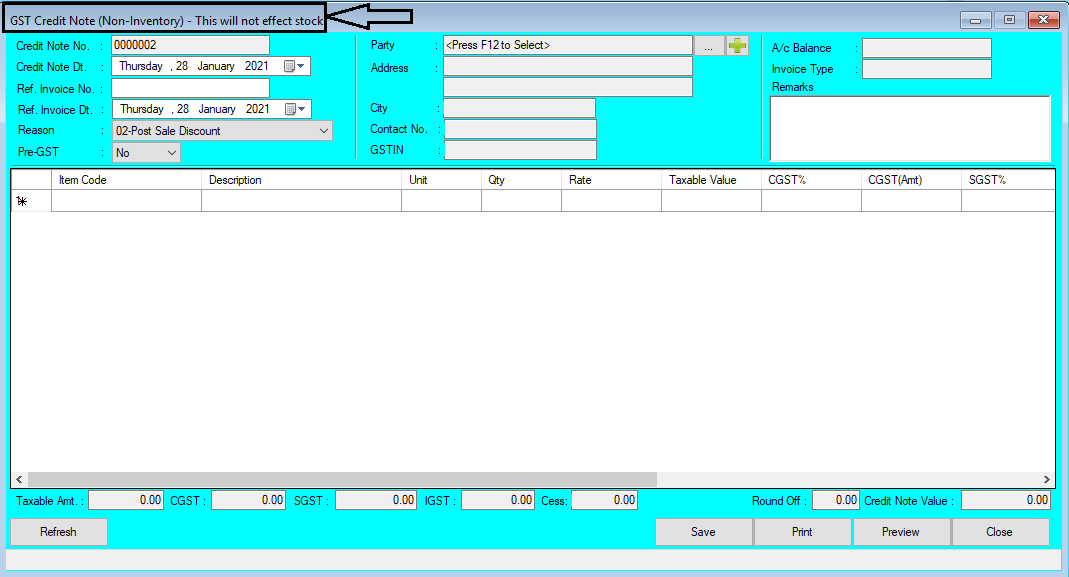
How to Create/Modify/Cancel GST Credit Note  in Chanakya ERP   Create GST Credit Note Click on  GST Credit Note  in  Inventory Menu  to open GST Credit Note option (as shown in below image). Credit Note No.  will be   Created  ( Automatically & Manual Setting in  Document Number Settings  option)  Select Credit Note Date  on Clicking on Date Drop Down Box Enter Reference Invoice No . with  Reference Invoice Date  which Was Generated during  Sales Select  the  Reason  of  GST Credit Note  ( Various Reason Available in Drop Down Box ) from  Drop Down List  you can Select according to your Needs and Mention   Pre-GST  information in  Yes  or  No .( Either Pre GST applied or Not ) Press  "F12"  Key to open  Party List  and  Select  the  Specific Party Details  Whose  GST Credit Note  is to be Cr...