Posts

Showing posts with the label Price List

Chanakya ERP Update Release 1.1.3.3
Image
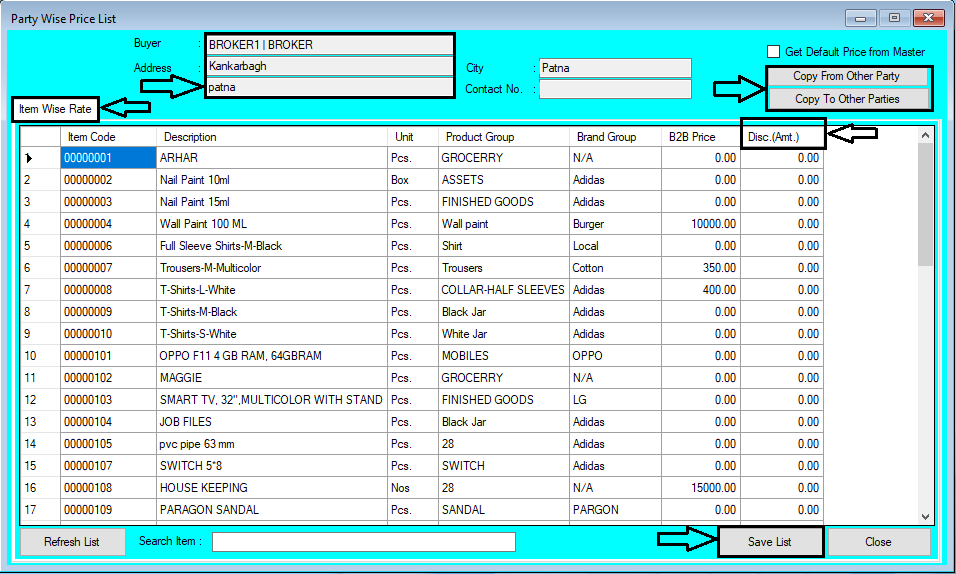
  Updates Released in New Version of Chanakya ERP 👉 All Vouchers List Report has been Updated 👉 Help Desk Mobile Application Released, Now you can Generate a Support Ticket from Chanakya ERP Mobile Application, You can find the Download Link Below  👇 https://play.google.com/store/apps/details?id=in.chanakyaerp.helpdesk 👉 Login with your License Id and License Password to Access the Mobile Application (Which has been Sent to Your Mail Id at the time of Software Purchase) 👉  Party wise Price List with Unit Discount has been Updated in which you can Define Discount According to Party wise, You can also Copy the Same Discount Rate for other Party by Clicking on "Copy to" and "Copy From" Option And Many more Enhancement For More Query/Support, Call us on +91 8447740155 Thank You !
Party Wise Price List Setting Help guide

Image
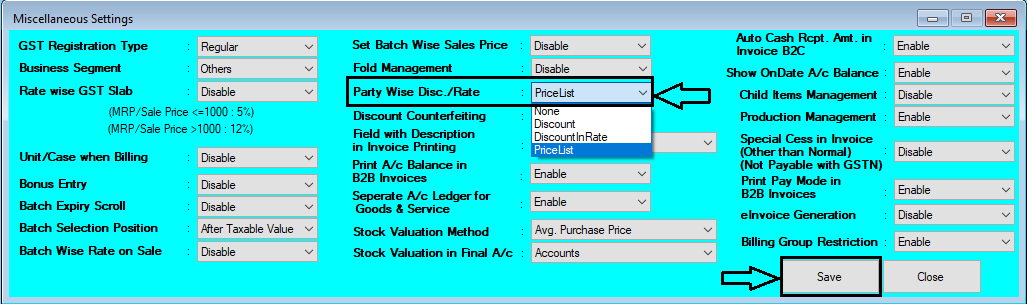
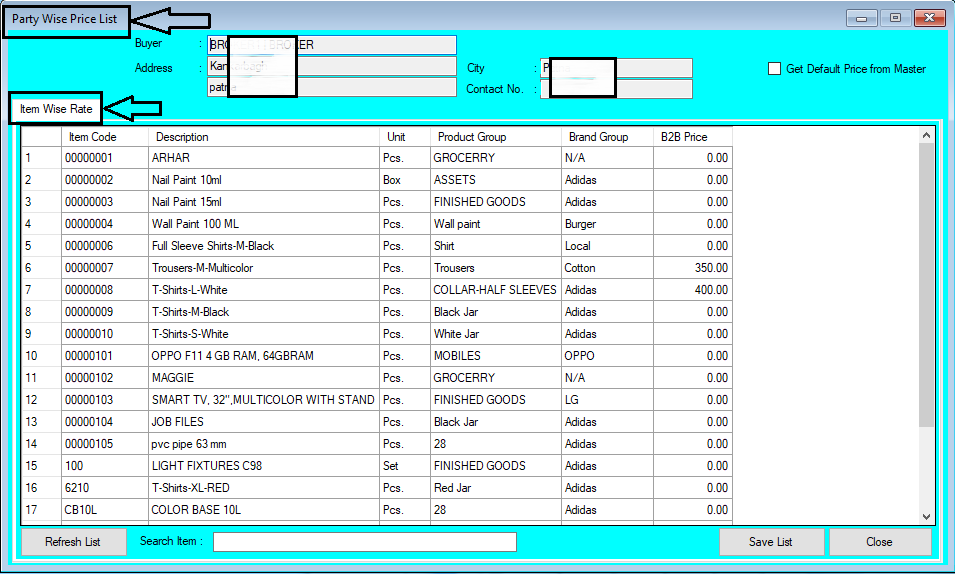
  How to Set Party Wise Price List in Chanakya ERP First of all Go To Tools Menu Open Misc. Settings Go for "Party Wise Discount Rate" Select "Price List" Option Click on "Save"   Logout and Login Software, To Enabled the Changes After Enabling Setting in Misc. Setting Go to "Master" Module Open "Party Wise Price List" Below Image Show the Module will open Like Same . Select Buyer by Pressing "F12" Buyer Details will be Auto filled After Selecting Buyer , Item will be Auto fetched from Item Master Section Your Can Search Item (Item code & Item Name) , from Search Box at Bottom of window Now Set Price of B2B for each Prescribed Item Enter the Price and Click on "Save List" , the Price will be set for that Particular Party on Particular Item Item Master Price Section could be also Fetched By Clicking on "Get Default Price from Master" You can also Refresh the List , By Clicking on "Refresh Li...

Chanakya ERP Update Release 1.1.2.4

Image
 Party Wise Price List Setting 👉 Now in Chanakya ERP Set Party Wise Price List 👉 Party Wise Price list Setting will Help User to Define B2B Sale Price for Defined Item which could be Fetched at the time of B2B Billing/Invoice Multiple Billing Group wise Filter Option in B2C Invoice Report and B2B Invoice Report And Many more Enhancement  For More Query/Support, Call us on +91 8447740155 Thank You !